
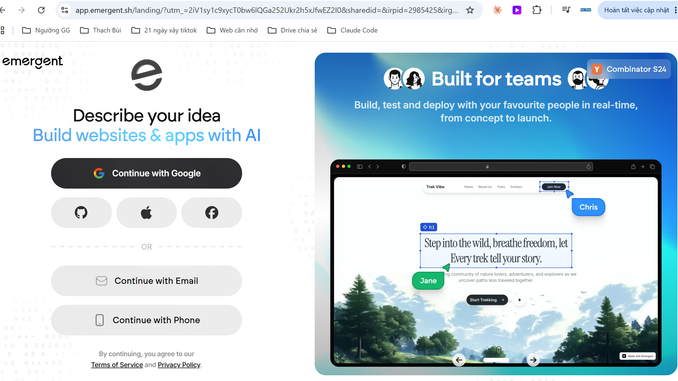
By the end of this guide, you’ll have a live, working SaaS MVP — frontend, backend, database, and Stripe billing — built from a chat prompt using Emergent.sh’s multi-agent pipeline, with your code safely backed up so you don’t lose it.
Disclosure: This page contains affiliate links. If you purchase through these links, I may earn a commission at no extra cost to you. I only recommend products I’ve personally used or thoroughly evaluated.
Last updated: September 2026
Table of Contents
- What You’ll Need
- Step 1: Sign Up and Pick a Plan
- Step 2: Write a Prompt That Actually Works
- Step 3: Review the Agent’s Build Plan Before It Codes
- Step 4: Refine the App Through Chat
- Step 5: Wire Up Stripe for Monetization
- Step 6: Test the App End to End
- Step 7: Back Up to GitHub Immediately
- Step 8: Deploy and Share Your Live Link
- Results & What to Expect
- Tips for Better Results
- Alternatives to This Approach
- FAQ
What You’ll Need
- An idea specific enough to describe in 3-4 sentences (vague prompts produce vague apps)
- 30-60 minutes for the first build session
- A GitHub account (free) — for backing up your generated code
- A Stripe account (free to create) — if your MVP charges users
An Emergent.sh account — sign up here →
Step 1: Sign Up and Pick a Plan
Start on Emergent’s Free (Beta) tier — 5 monthly credits plus 10 daily credits — which is enough to run through this entire tutorial once and see whether the workflow fits how you think. If you like what you get and want to keep iterating past the first build, upgrade to Standard ($20/month, 100 credits), which also unlocks GitHub sync — you’ll need that in Step 7.

Pro tip: Don’t upgrade before your first build. Run the free tier through Steps 2-6 first so you know your prompt actually produces something worth paying to continue.
Step 2: Write a Prompt That Actually Works
This is the step that determines whether your first build is usable or a wasted credit run. Emergent’s architect agent plans the entire app structure from what you type, so vague input produces a vague plan.
A weak prompt: “Build me a SaaS app for freelancers.”
A strong prompt names the core feature, the user roles, and the monetization model:
“Build a SaaS app where freelancers can create client invoices, track payment status, and send automated payment reminders. Two user roles: freelancer (creates invoices) and client (views and pays invoices). Include a free tier limited to 3 invoices/month and a paid tier ($15/mo) with unlimited invoices, billed through Stripe.”

Notice the structure: what it does, who uses it, how it makes money. That last part matters — naming your monetization model up front means the architect agent factors billing logic into the database schema from the start, instead of you bolting it on after the fact.
Step 3: Review the Agent’s Build Plan Before It Codes
After you submit your prompt, Emergent’s architect agent returns a proposed build plan — pages, data model, and integrations — before the developer and designer agents start generating code. Don’t skip past this screen.
Read it for three things:
- Missing features: Did it drop something you mentioned? Add it back in before approving.
- Extra scope: Did it add pages or features you didn’t ask for? Trimming now saves credits later.
- Data model sense-check: For the invoice example, you’d want to confirm it planned separate invoices and payments tables, not one bloated table trying to do both.
Approving a clean plan here is the single highest-leverage thing you can do to avoid burning credits on a rebuild later.
Step 4: Refine the App Through Chat
Once the developer and designer agents generate the first version, you’ll get a working preview. This is where you iterate — not by starting over, but by chatting targeted changes:
“Make the invoice status badge red for overdue, yellow for pending, green for paid.”
“Add a dashboard summary card showing total outstanding invoice amount.”
Each change re-runs part of the agent pipeline and consumes credits, so batch related changes into one message rather than sending five one-line edits in a row — it’s both faster and cheaper.
Step 5: Wire Up Stripe for Monetization
If your MVP charges users — like the paid tier in our invoice example — Emergent has Stripe built in as a first-class integration rather than something you configure from scratch. Connect your Stripe account when prompted, then tell the agent which plan(s) should be gated behind payment:
“Connect Stripe checkout to the paid tier. Free tier stays capped at 3 invoices/month; paid tier unlocks unlimited invoices at $15/month.”
This is the step that turns a demo into something you can actually validate — real users hitting a real paywall tells you far more than a survey ever will.
Step 6: Test the App End to End
Use Emergent’s built-in testing flow before you consider the build “done.” Walk through the actual user journey yourself:
- Sign up as both user roles (freelancer and client, in our example)
- Create the core object (an invoice)
- Trigger the paid-tier limit and confirm the Stripe checkout fires correctly
- Check the reminder/notification logic if your app has one
Catching a broken flow here costs you a chat message. Catching it after you’ve shared the link with real users costs you their trust.
Step 7: Back Up to GitHub Immediately
Don’t skip this step, and don’t do it “later.” User reviews of Emergent include real reports of projects disappearing with no backup warning — the fix is simple and takes one click on the Standard plan: use Save to GitHub the moment your app is in a state you’d be upset to lose.
This also means you now have a real, editable codebase (React/Next.js frontend, FastAPI or Node.js backend) that you — or a developer you bring on later — can keep building on entirely outside Emergent if you need to.
Step 8: Deploy and Share Your Live Link
Once you’re happy with the tested build, use Emergent’s publish flow to get a live, shareable URL. Send it to five to ten real prospective users in your target audience and watch what they actually do — not what they say they’d do. For a SaaS MVP, the metric that matters most at this stage is whether anyone hits your Stripe checkout, not whether they compliment the UI.
Results & What to Expect
Following these eight steps, expect a working, testable SaaS MVP — auth, core feature, and Stripe billing — from a single focused session, typically well under the hour mark for something at the complexity of the invoicing example above. More ambitious ideas (multiple integrations, complex permission logic) will take more prompting rounds and more credits, since each meaningful change re-triggers part of the agent pipeline rather than a small patch.
Treat the first version as a validation tool, not a finished product. Its job is to get real signal from real users fast — not to be the app you scale to 10,000 customers on unmodified.
Tips for Better Results
- Name your monetization model in the first prompt. Retrofitting billing logic after the data model is set costs more credits than including it up front.
- Batch your refinement requests. Group related UI/logic changes into one message instead of several small ones.
- Back up to GitHub after every session, not just once at the end — treat every Emergent project as disposable until it’s in your own repo.
- Test the paywall yourself before sharing the link. A broken Stripe checkout is the single worst first impression an MVP can make.
Alternatives to This Approach
If your MVP is web-only and you want the fastest possible first build with tighter design control, Lovable’s Supabase-backed workflow is worth comparing — see our Emergent vs Lovable comparison for the full breakdown. If your idea leans heavily on custom backend processes (webhooks, scheduled jobs, a Python service), Replit Agent’s deeper backend runtime may fit better than either. Emergent’s advantage in this tutorial specifically is the combination of a planned multi-agent build with native mobile output and built-in Stripe — useful if your MVP needs to charge users and potentially ship to mobile from the same codebase.
FAQ
How long does it take to build a SaaS MVP with Emergent.sh?
A focused first build for a moderately scoped idea (a couple of user roles, one core feature, Stripe billing) typically takes under an hour of active session time. More complex ideas take longer as you iterate through more prompting rounds.
Do I need to know how to code for this?
No — the workflow above doesn’t require writing code. That said, having a developer review the generated codebase before you scale past the MVP stage is a good idea, especially for payment and auth logic.
What if the app loses my work or breaks something?
This is a documented risk with Emergent — back up to GitHub after every meaningful session (Step 7) rather than treating the platform as your only copy of the code.
Can I add mobile support to the same MVP later?
Yes — Emergent generates Expo/React Native mobile output from the Standard plan, so you can extend the same web MVP to mobile within the same project rather than starting over.
How many credits does a typical MVP build use?
It depends heavily on scope and how many refinement rounds you run, but a focused build like the invoicing example in this guide comfortably fits within a Standard plan’s 100 monthly credits with room to iterate.
Leave a Reply