
Quick Verdict: Flowith replaces the linear chat window with an infinite branching canvas and bundles Claude, GPT, and Gemini plus an autonomous agent (Neo) under one credit subscription — a genuinely different workflow for big, multi-threaded projects, but overkill and credit-expensive if you just want quick answers. Rating: 3.9/5
Disclosure: This page contains affiliate links. If you purchase through these links, I may earn a commission at no extra cost to you. I only recommend products I’ve personally used or thoroughly evaluated.
Last updated: September 2026
Table of Contents
- What Is Flowith?
- Key Features
- Flowith Pricing
- What Working in Flowith Actually Looks Like
- Pros and Cons
- Who Is Flowith Best For?
- Flowith Alternatives
- FAQ
- Final Verdict
What Is Flowith?
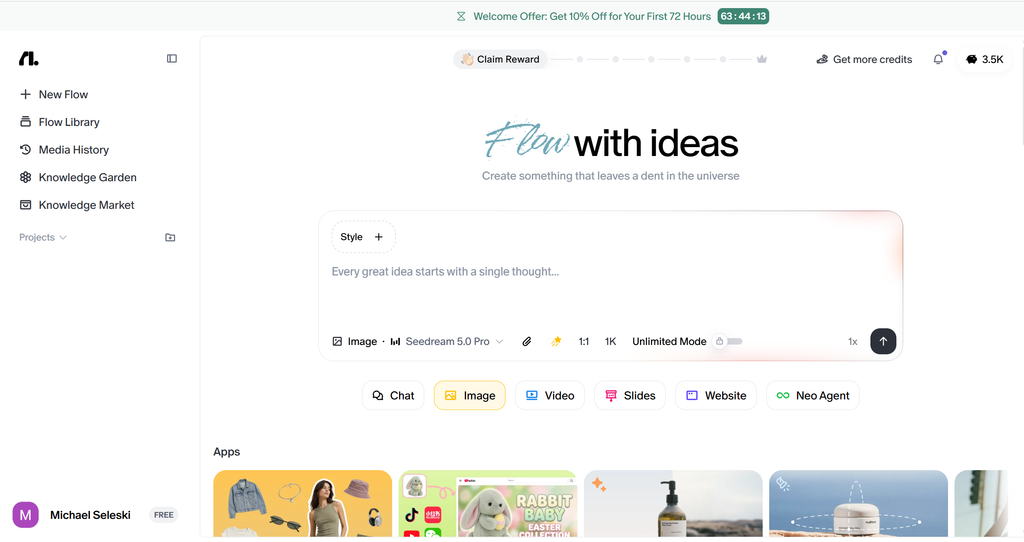
Flowith is an AI agentic creative workspace built around a 2D infinite canvas instead of a single scrolling chat thread. Every prompt, reply, image, or video you generate becomes a movable node on that canvas, and you can branch off any node to explore a different direction — running parallel threads side by side instead of losing earlier attempts in chat history you have to scroll back through.
Underneath that spatial interface sits a marketplace of models — Claude, GPT, and Gemini, plus dedicated image and video models — all accessible through one unified credit subscription, so you’re not juggling separate accounts for separate tools. Flowith’s other headline feature is Agent Neo, an autonomous agent built for long, multi-step tasks rather than single-turn answers.
The category here is closer to Genspark or Manus (autonomous, multi-step AI agents) than to a standard chatbot — but Flowith’s spatial canvas is its clearest point of differentiation from both.
Key Features
Infinite Branching Canvas
This is what makes Flowith feel different from the first minute. Instead of one linear conversation, every response is a node you can branch from — useful for comparing three different approaches to the same problem side by side, or for research projects where you need to keep multiple lines of inquiry visible at once rather than buried in scroll history.
Agent Neo
Flowith’s autonomous agent runs with a 10-million-token context window (roughly 7,500 pages of text) and can execute 1,000+ inference steps on a single task. The company positions Neo as capable of generating complete websites, 2D games, pitch decks, academic papers, and multi-part video series from one prompt — genuinely broad scope for an autonomous agent, though ambitious multi-part tasks like these are exactly what consumes credits fastest.
Multi-Model Marketplace
Rather than picking one model provider and living with its trade-offs, Flowith gives you access to Claude, GPT, and Gemini (plus image and video generation models) inside the same canvas and the same credit pool — useful if different models suit different parts of your workflow.
Knowledge Garden
Flowith markets this as a unified context and knowledge system — a place to store, connect, and reuse information across projects instead of re-explaining context to the AI every time you start a new thread. It’s the feature aimed squarely at researchers and writers doing sustained work on one topic over weeks, not one-off queries.
Real-Time Collaboration
Multiple people can work on the same canvas simultaneously, which turns Flowith from a personal tool into something a small team can actually plan and research inside together — closer to a collaborative whiteboard than a private chat log.
Flowith Pricing
Flowith runs on a unified credit system — text, image, and video generation all draw from the same pool, across four tiers:
| Plan | Price | Credits | Best For |
|---|---|---|---|
| Starter | Free | One-time credit allotment on signup (reported figures vary by source) | Testing the canvas and Agent Neo before committing |
| Pro | $19.90/mo ($17.91/mo billed annually) | Monthly credit allotment | Regular individual use across text, image, and light agent tasks |
| Ultimate | $49.90/mo ($44.91/mo billed annually) | Higher monthly credit allotment | Heavier Agent Neo use, video generation, power users |
| Infinite | $499.90/mo ($399.92/mo billed annually) | Largest monthly credit allotment | Teams or agencies running Flowith as core infrastructure |
The detail worth flagging: credits don’t roll over, and video generation is a genuine credit sink — a single video can run anywhere from roughly 475 to 6,000 credits depending on length and quality. If your use case leans toward video, budget for the Ultimate tier rather than Pro, or you’ll be topping up mid-month.
Curious what the canvas feels like? Try Flowith →
What Working in Flowith Actually Looks Like
Here’s the typical session, based on how the platform is designed to work: you start a prompt on the canvas, and the response lands as a node. If you want to try a different angle on the same problem, you branch from that node rather than editing your original message — so you end up with two (or five) parallel attempts sitting next to each other, visually comparable, instead of one thread where earlier ideas are buried above.
For a research-heavy task, you’d lean on the Knowledge Garden to keep source material and prior findings connected across sessions, so a new thread three weeks later can pull from what you already established rather than starting cold. For something more autonomous — “build me a working pitch deck from this raw research” — you’d hand it to Agent Neo and let it run its multi-step process, checking back in on progress rather than prompting turn by turn.
The trade-off is upfront investment: several reviewers describe the first session as feeling slow while you learn to think spatially instead of linearly. If you just need a fast, single answer, opening a plain chatbot is still faster than orienting yourself on a canvas.
Pros and Cons
What I Liked
- The branching canvas solves a real problem — comparing multiple approaches to the same task side by side, instead of losing earlier attempts in chat scroll, is genuinely useful for research and creative work.
- One subscription, several frontier models — not having to maintain separate ChatGPT, Claude, and Gemini subscriptions to access all three is a real convenience.
- Agent Neo’s context window is substantial — a 10-million-token window supports genuinely long, multi-step tasks that would choke a standard chat session.
- Real-time collaboration makes it a legitimate team research/planning tool, not just a solo power-user toy.
What Could Be Better
- Real learning curve. The spatial interface takes an adjustment session or two before it clicks — this isn’t a drop-in ChatGPT replacement for someone who wants to start typing immediately.
- Credits burn fast on video and heavy Agent Neo tasks, and unused credits don’t roll over month to month — easy to either waste allowance or run out mid-project.
- Overkill for quick, one-off queries. If you just need a fast single answer, the canvas adds friction a plain chatbot doesn’t have.
- Mobile experience is limited. The canvas is built for a large screen — phone usage is reported as awkward, so this isn’t a great fit if mobile is your primary device.
- Thin real-world review volume compared to more established tools, since Flowith is newer to the category — worth treating early claims (like specific speed-improvement percentages) as company-reported rather than independently verified.
Who Is Flowith Best For?
- Researchers and writers on multi-week projects: The Knowledge Garden and branching canvas are built for sustained work on one topic, not single-session tasks.
- Teams that plan and research together: Real-time collaboration on a shared canvas is a meaningfully different (and often better) fit than passing a shared doc back and forth.
- Power users who want multi-model access in one place: If you’re already paying for multiple AI subscriptions separately, consolidating under one credit pool can simplify things.
- Skip it if: You mostly need fast, single-turn answers, primarily work from a phone, or want to avoid a learning curve — a standard chatbot will serve you better and cheaper.
Flowith Alternatives
| Feature | Flowith | Miro AI | Manus | ChatGPT Plus |
|---|---|---|---|---|
| Best For | Branching research/creative canvas + agent | Visual whiteboarding with AI assist | Hands-off, end-to-end autonomous tasks | Fast single-turn answers |
| Starting Price | $19.90/mo (Pro) | Varies by plan | Varies by plan | $20/mo |
| Standout Strength | Multi-model access + Agent Neo + Knowledge Garden | Familiar whiteboard UX teams already know | Closest to full end-to-end automation | Simplicity and speed for quick queries |
| Key Weakness | Learning curve, credit-hungry video/agent tasks | Less depth on autonomous multi-step agent work | Less structured for parallel-branch comparison | No spatial canvas or multi-model bundling |
If you already live in Miro for team whiteboarding, Miro AI is the lower-friction way to add AI without learning a new interface. If your priority is a fully hands-off agent that just goes and does an end-to-end task, Manus is the closer comparison. If you genuinely just want fast answers most of the time, don’t overthink it — ChatGPT Plus remains the simpler, cheaper choice. Flowith’s edge is specifically the combination of branching visual comparison with multi-model access and a genuinely large-context autonomous agent.
FAQ
Is Flowith worth the money?
For sustained research, writing, or creative projects where comparing multiple approaches matters, yes — the canvas and Knowledge Garden solve a real problem. For quick one-off questions, a standard chatbot is faster and cheaper.
Does Flowith offer a free trial?
Yes — the Starter plan is free with a one-time credit allotment, enough to test the canvas, model marketplace, and Agent Neo before committing to a paid tier.
What are the best alternatives to Flowith?
Miro AI if you want AI added to a familiar whiteboard interface, Manus for a more hands-off autonomous agent, and ChatGPT Plus if you mainly need fast single-turn answers without a learning curve.
Does Flowith work well on mobile?
Not especially — the canvas is designed for a large screen, and the mobile experience is reported as limited. Plan to use Flowith primarily on desktop.
How fast do credits run out on Flowith?
It depends heavily on usage — text tasks are relatively light, but video generation (475-6,000 credits per video) and heavy Agent Neo runs consume credits quickly, and unused credits don’t roll over month to month.
Final Verdict
Flowith’s branching canvas is a genuinely different — and for the right use case, genuinely better — way to work with AI than a linear chat thread. Being able to visually compare parallel attempts at a problem, keep long-running research connected through the Knowledge Garden, and hand off multi-step work to Agent Neo’s large context window covers real gaps in the standard chatbot experience.
It’s not the right tool for everyone, though. If your typical AI use is a quick question and a quick answer, the learning curve and credit-based pricing work against you, and a plain chatbot will serve you faster and cheaper. Flowith earns its subscription price specifically on sustained, multi-threaded work — research projects, content pipelines, and team planning sessions — where the spatial layout pays for the time it took to learn it.
Our recommendation: Try Flowith free on the Starter plan → — run one real research or writing project through it before judging whether the canvas is worth the adjustment.
Rating: 3.9/5
Leave a Reply