

Bubble.io Review (2026): Can You Really Build a SaaS Without Code?
Quick Verdict: Bubble.io is the most powerful no-code platform for building production-grade web applications — but it comes with a steep learning curve and pricing that can creep up fast as you scale. For non-technical founders who want to ship a real product without a dev team, it’s worth every penny. 4.3/5
Disclosure: This page contains affiliate links. If you purchase through these links, I may earn a commission at no extra cost to you. I only recommend products I’ve personally used or thoroughly evaluated.
Last updated: June 2026
Table of Contents
- What Is Bubble.io?
- Key Features of Bubble.io
- Bubble.io Pricing
- My Experience Using Bubble.io
- Pros and Cons
- Who Is Bubble.io Best For?
- Bubble.io vs. Alternatives
- FAQ
- Final Verdict
What Is Bubble.io?
Bubble.io is a visual, full-stack no-code development platform that lets you build web applications without writing a single line of code. Founded in 2012 by Josh Haas and Emmanuel Straschnov, it has grown into the most capable platform in the no-code ecosystem — the one serious builders reach for when they want to launch something real.
Unlike landing page builders like Wix or Squarespace, Bubble handles every layer of a real application: a visual frontend editor, a built-in relational database, a workflow engine for business logic, user authentication, and API integrations — all in one place.
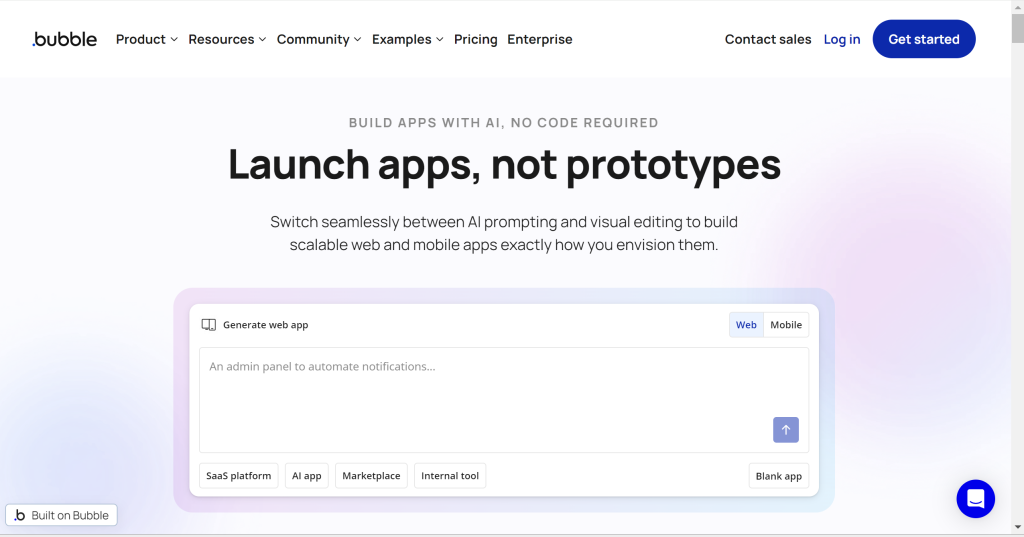
The “build without coding” promise isn’t just marketing copy here. Thousands of startups have launched real, revenue-generating SaaS products on Bubble — marketplaces, CRMs, booking platforms, social networks. If you’ve been putting off your app idea because you can’t code, this Bubble.io review is for you.
Key Features of Bubble.io
Visual App Editor
Bubble’s drag-and-drop editor is its core. You design your UI on a canvas — placing buttons, text, inputs, images, popups, and custom groups exactly where they need to go. The newer responsive layout engine gives you proper flexbox-style control, so your app looks clean on mobile without painful breakpoint hacks.
The editor is dense with options, which is both its strength and its biggest onboarding challenge. But once the mental model clicks, you can build remarkably sophisticated interfaces without frustration.
Built-In Relational Database
Every Bubble app ships with a built-in database. You define data types (“User”, “Order”, “Post”), add fields, and set relationships between them — all visually, no SQL required.
Privacy rules let you control exactly what each user can read or write. A logged-in user sees only their own records. Admins see everything. This level of fine-grained data access control is rare among no-code tools and is what makes Bubble viable for real products.
Workflow Engine
Workflows are Bubble’s back-end logic layer. “When user clicks button → create a database record → send a confirmation email → redirect to dashboard.” You chain actions visually, with conditionals, loops, and scheduled tasks.
This is where Bubble separates from simpler tools. Complex business logic — subscription billing triggers, multi-step onboarding, Stripe webhook handling, real-time notifications — all built without code. Backend workflows (server-side) run independently of the browser, essential for cron jobs and processing payments reliably.
Plugin Marketplace (8,000+ Plugins)
Bubble’s plugin ecosystem is one of the largest in no-code: 8,000+ plugins covering Stripe, PayPal, Twilio, SendGrid, OpenAI, Google Maps, Mapbox, Intercom, and dozens more. Most popular integrations have a dedicated, well-maintained plugin.
Quality varies — check the last-updated date and user reviews before committing to a plugin. But for the vast majority of integration needs, you’ll find what you need without touching an API directly.
Native Mobile App Builder
In June 2025, Bubble launched its native mobile app builder into public beta — a platform-defining moment. Using React Native under the hood, you can now build iOS and Android apps directly inside Bubble and publish them to the App Store and Google Play.
Over 180,000 mobile apps were built during the beta period alone. It’s still maturing and not yet ideal for complex mobile experiences, but for straightforward apps it’s already viable. This closes the biggest gap Bubble had versus dedicated mobile builders like FlutterFlow and Adalo.
API Integrations
The API Connector lets you connect to any REST or GraphQL API in minutes. Authenticate, define your call, map response fields — then trigger it from workflows or display the data in your UI.
Bubble also supports OAuth 2.0 natively, which is critical for building apps where users connect their own accounts (Google, Slack, Salesforce). Combined with Zapier or Make.com, you can integrate virtually any external service.
Bubble.io Pricing
Bubble uses a Workload Unit (WU) model — you pay based on server resources your app actually consumes, not just a flat monthly fee. This keeps costs low for new apps and scales with usage, but it also means your bill can grow unexpectedly as your user base expands.
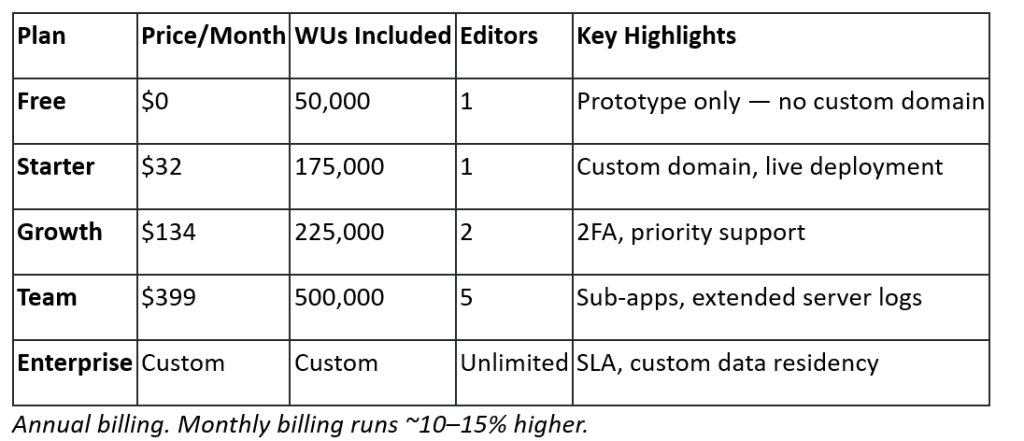
What are Workload Units? Every action your app performs — a database read, a workflow run, a file upload — consumes WUs. A simple app with a handful of users burns through 50,000 WUs/month easily. A SaaS with 500+ active users might need the Team plan or additional WU top-ups (available at $10 per 200,000 WUs).
For most MVPs: Start with the Starter plan at $32/month. It’s fully sufficient for early traction. Upgrade to Growth when you hit consistent usage or need 2FA for security-conscious customers.
Free trial: New apps get a 14-day free trial of the Starter plan — full access to custom domain deployment so you can test your live app before committing to a subscription.
Try Bubble.io free for 14 days →
My Experience Using Bubble.io
The first week on Bubble is humbling. The interface is dense — Design, Workflow, Data, Styles, and Plugins panels, each with their own sub-layers. Most new builders hit a wall around day three: “I can visualize what I want. I just can’t figure out how to tell Bubble to do it.”
The breakthrough comes when the core triangle clicks: elements are your UI, workflows are your logic, and the database is your state. Once that model is internalized, building velocity picks up dramatically.
A realistic onboarding estimate: 20–40 hours before you’re building fluently. Bubble’s official documentation is thorough, the Academy courses are well-structured, and the community forum is one of the most active in no-code — a quick search almost always finds someone who hit the same wall.
For a practical example: a SaaS dashboard with user login, Stripe subscription tiers, a relational database of client records, and an in-app notification system took roughly three weeks part-time to build from scratch. In traditional development, that same product would require a full-stack engineer and at least two to three months.
The main friction point is performance at scale. As databases grow and workflows become more complex, page load times can increase. Bubble has been shipping performance improvements throughout 2025, but latency-sensitive applications — real-time trading, high-frequency data processing, multiplayer games — remain outside Bubble’s ideal use case.
Ready to start building? Sign up for Bubble.io →
Pros and Cons
What I Liked
- True full-stack in one platform — frontend, backend, database, auth, and deployment without stitching together separate services
- Production-grade capability — real businesses run on Bubble, not just prototypes
- 8,000+ plugin ecosystem — almost every integration need is already solved
- Native mobile app builder — iOS/Android apps now buildable from the same environment (beta)
- Granular privacy rules — row-level database security that rivals hand-coded applications
- Scalable hosting — Bubble handles servers, CDN, and autoscaling automatically
What Could Be Better
- High learning curve — weeks to fluency, not hours
- WU pricing is unpredictable — hard to forecast infrastructure costs before you have real user data
- Vendor lock-in — no code export; migrating off Bubble requires rebuilding from scratch
- Performance limits — complex queries on large datasets can be sluggish
- Mobile builder still in beta — native mobile isn’t ready for complex use cases yet
Who Is Bubble.io Best For?
- Non-technical founders validating a SaaS idea without a developer — Bubble compresses months of development into weeks
- Indie hackers and solopreneurs building subscription tools, directories, or marketplaces as side projects
- Freelancers and agencies delivering web app projects to clients faster than custom code allows
- Early-stage startups who need an MVP live quickly to test product-market fit or close a seed round
Skip Bubble if: you’re building a real-time, latency-sensitive application (gaming, live trading, video streaming) or if your team has strong engineering capacity and prefers code-first development for maximum control and portability.
Bubble.io vs. Alternatives

Webflow wins on design aesthetics and SEO — it’s the right call for marketing sites and content platforms. For anything requiring real app logic (user accounts, dynamic data, business workflows), it falls short.
Adalo is cheaper and faster for basic mobile apps. If you just need a published iOS/Android app and your logic is simple, Adalo’s fixed pricing and lower learning curve are attractive. But for complex web apps, it can’t compete.
Glide is the fastest zero-to-working-app experience if your data already lives in Google Sheets or Airtable. For internal tools and lightweight consumer apps, it’s excellent. For anything with custom logic or scale ambitions, it’s too limited.
For serious web applications — SaaS products, marketplaces, client portals — Bubble wins on capability, every time.
FAQ
Is Bubble.io free to use?
Bubble has a free plan that’s great for learning and prototyping — no credit card required. However, the free plan doesn’t support a custom domain or deploying to real users. To launch a live app, you need the Starter plan at $32/month.
How hard is Bubble.io to learn?
Bubble has a steep learning curve compared to simpler no-code tools. Most builders spend 20–40 hours before feeling truly fluent. The Bubble Academy, official documentation, and community forum are all excellent resources that significantly shorten that timeline.
Can you build mobile apps with Bubble.io?
Yes. As of June 2025, Bubble’s native mobile app builder is in public beta. You can build iOS and Android apps using React Native and submit them to the App Store and Google Play — all inside the same Bubble environment. The feature is still maturing but functional for many use cases.
Is Bubble.io good for SaaS?
Absolutely. Bubble is one of the most popular platforms for launching SaaS products without a dev team. It handles user authentication, Stripe billing, relational data, and complex workflows natively. Many SaaS companies have scaled to thousands of paying users on Bubble.
What are the main alternatives to Bubble.io?
The strongest alternatives are Webflow (better for website design and content), Adalo (better for simple mobile apps), Glide (better for spreadsheet-based apps), and FlutterFlow (better for high-performance native mobile). For full-stack web app development, Bubble remains the category leader.
Final Verdict
Bubble.io is the most capable no-code platform available for building full-stack web applications in 2025. It won’t win on simplicity — the learning curve is real, and the WU pricing model requires monitoring as you grow. But no other no-code tool gives you the same depth: real database design, complex business logic, API integrations, user auth, and now native mobile — all in a single visual environment.
If you’re a non-technical founder who has been waiting to build your SaaS idea, Bubble is the platform to bet on. The 2025 iteration — with the mobile builder in beta and continued performance improvements — is the best the platform has ever been. Builders who invest the learning hours consistently report launching products in weeks that would take months in traditional development.
Our recommendation: Get started with Bubble.io here — the most powerful no-code platform for building production web and mobile apps without writing code.
Leave a Reply